Running Macros on Just Part of a Form
The repeat type you use determines how many lines of data a macro will process on a target form. You can specify the exact number of lines to process by using either the Run once or Run "n" times repeat types. But what if you'd like the macro to process part of a form without having to know or care about the number of lines involved? That's easy:
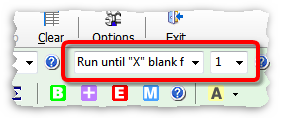
| 1. | Use these macro settings (Repeat until "X" blank fields, with "X" blank fields set to 1): |
| 2. | Be sure there is at least one blank row below the group of rows you want the macro to process in the target application. |
| 3. | Before running the macro, click in the Begin field on the first row you want the macro to process. |
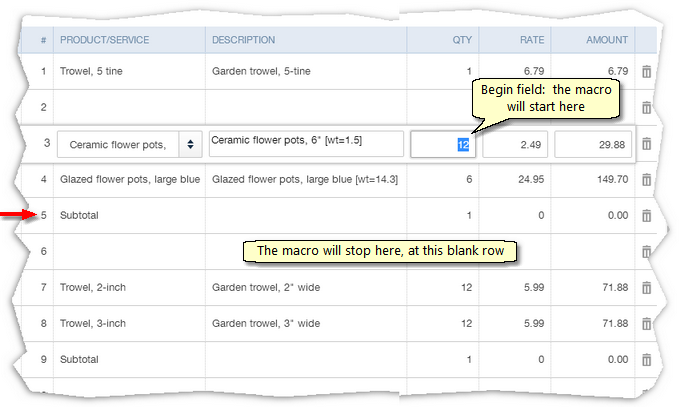
Here's a QuickBooks Online invoice, ready for a macro to be invoked (run).
Notes:
| ® | The Qty field is the macro's Begin field, and we've clicked in it on line 3. |
| ® | The macro will process lines 3 through 5 and ignore any lines above line 3. |
| ® | The macro will provide a Subtotal on line 5, then stop running when it encounters the blank row (line 6). |
| ® | The second Subtotal row (line 9) will not be processed. |
|
"X" blank fields determines how many blank rows will stop a macro.
The "X" blank fields setting only affects macros when the Repeat until "X" blank fields repeat type is used. If "X" blank fields is set to 1 then a single blank row in the form will stop the macro. If "X" blank fields is set to 2, then two blank rows would be needed to stop the macro, etc.
Macros will also stop, of course, if they run out of data to process. |

A final note
You could achieve the same result by using the Run "n" times repeat type, then entering a repeat count of 3 (to process lines 3 through 5, the same as shown above. But the next time you run the macro, what if you needed to subtotal 4 rows? ...or 7 rows? You'd have to count the number of rows involved to be sure you entered a correct repeat count.
Using the Repeat until "X" blank fields approach shown in the example above is more automatic and less error prone. It will run the macro on any number of rows, then stop at a blank line.